July 25, 2026, 07:49:37 AM

Author Topic: Post your mining rig and anything you like to share from your experience!  (Read 34607 times)

0 Members and 1 Guest are viewing this topic.

Offline sizzflair

  • Gold Miner
  • ****
  • Posts: 180
  • Karma: +8/-0
    • View Profile
Hey guys,

I've seen threads in other coin forums on showing off their rig.  It can spark some new ideas on setups and share our experiences on what we've learned and what we could have done better.  I did most of my reading on litecoin forums, but I haven't mined any LTC yet.  Had more faith in GLD at the moment haha.

Intro
I started to read about bitcoins/litecoins early November before it shot through the roof.  I was deployed at the time so I couldn't really get into investing in it, but kept on reading and learning.  As I came home in December, I decided to get two rigs going as a hobby.  Got into mining a month ago and learned a lot throughout the process.  I really like to tinker with computers so I took the plunge.  It's been fun so far, even though I went through a lot of issues so I figured I would share my experiences.  Most of the mistakes I've made were due to my lack of knowledge in terms of electrical components :)

Justification
Even though I purchased GLD directly with money (Thanks Alty), I decided to mine for two reasons.  One, I wanted to build a computer for fun and see how this whole mining thing worked.  Two, I wanted to invest long term and for some reason crypto market was a bubble and all my coins were worthless tomorrow, at least I would have hardware I could use and sell :).  I was planning on buliding a sweet driving/flight sim down the road with 3 1440p monitors, so having multiple GPUs weren't necessarily a bad thing, except for a dent in my wallet  :P

Component Choice
a. CPU/Mobo:  I went with AMD because it was cheaper than Intel.  I think I saved about $40-60 bucks over intel overall.  Mining is not CPU intensive so it didn't matter for me.  For the motherboard, it didn't really matter much if you spent $300 or $100 on your motherboard as long as it had the right amount of PCI-e lanes.  So I went with the cheapest motherboard that had 2 PCI-e 16x lanes and 2 PCI-e 1x lanes.  The good thing about buying higher end board is that you have more lanes to mess around with if one was to go bad and it's probably more durable, but that's what warranty is for.

b. RAM:  The cheapest 4GB RAM stick I could find.  Even though Mobo supports dual channel memory, single channel is good enough according to others.  However, there is a possibility that the newer R9 series AMD GPUs may require more RAM to run more threads... I may purchase another 4GB RAM down the road when the prices go down just to be safe.

c. PSU:  This is very important and I wish I knew more about PSUs before I just went off of the wattage numbers.  I chose Lepa G1600w which was the only 1600w PSU in the market.  Others were 1500w that cost a little more at the time.  The thing with Lepa G1600w is that it's  multi rail that supports only about 360w per rail (30 amps), which may limit the overclockability of each card if you want to push it to the limits. 

d. GPU:  I first looked for 7950s because they were supposedly cheap ($150-200) at hashrate of 600-700.  However, I could only find them at $300 at the time due to the increasing demand of mining rig components.  I made the decision to go with R9 290s because they were $400 each and came with BF4 game coupon, that I could sell and use myself.  A week after I purchased my GPUs, the prices shot up to $500-550 per card!  Another reason I chose the R9 290s was that it was a high end gaming card as well so if mining was to die, at least I could make killer gaming rigs.  There are plenty of choices on this one so look around and keep doing your research.  Think of hashrate, cost, and how much watts it require to run at mining (stock and overclocked).  Don't get Nvidia cards.

e. OS:  Went with Win 7 because I was most comfortable with it and driver support was probably best out of Linux and Win 8.1.

f. HDD:  I went with a 128GB SSD that was on sale.  Could have saved some money with mechanical HDDs, but faster boot-up speed really helps when you're troubleshooting the rig or updating drivers and other software that require a reboot.  Time = money and SSDs also have a lesser chance of failure.

Rig
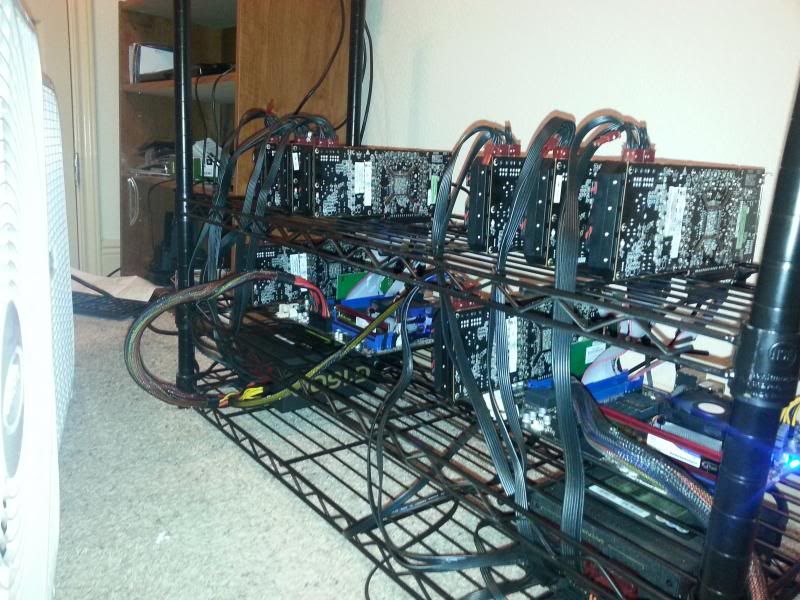
I decided to NOT use milk cartons because I wanted to put two rigs in the same place right next to each other.  I ended up buying a metal shelf on amazon, because it would be strong and I could configure it the way I wanted.

For cooling, at first I was going to get some 120mm/140mm fans, but decided to get a box fan instead.  That way it can cool all the components and only have to worry about 1 fan.  The downside is the noise.

I also got powered risers to spread out the GPUs for better cooling and power stability.
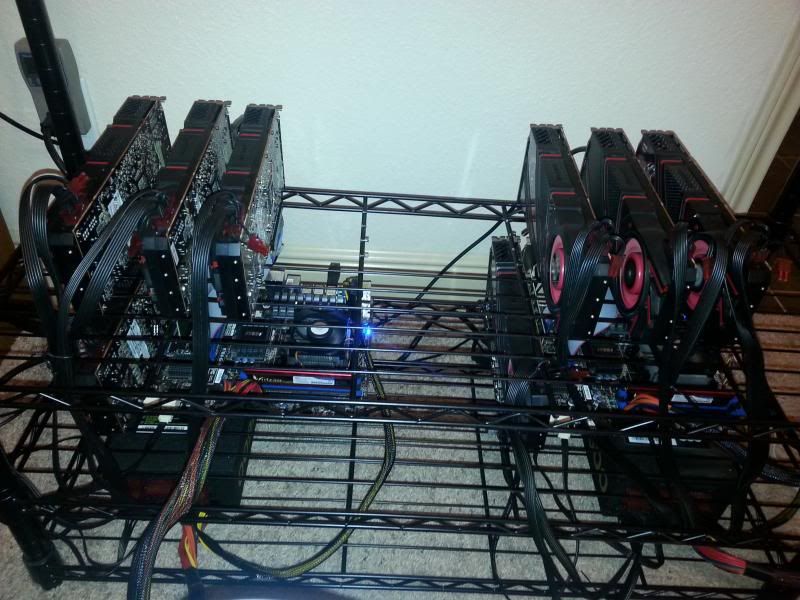


CPU: AMD Sampron
Motherboard: MSI 970A-G46 AM3/3+
PSU: Lepa G1600
RAM: 4GB Vulcan DDR3 1600mhz CL9
OS: Win 7
HDD: 128GB Kingston V300 SSD
GPU: 4 x R9 290s running stock voltage, clocks, and memory.
Network: Edimax PCI Wireless 300MBs
Hashrate:  Around 820-840 per card.
Wattage: 1300-1350w

Issues I ran into
First was that my PSU kept shutting off.  I could not run more than 3 cards.  I had driver issues.  Stability issues where one gpu would keep failing randomly.  Pretty much anything you can think of minus burning my house down  :o

What I've learned from my mistakes
- Make sure you know what kind of PSU you are getting.  Initially, I didn't know they were multi rail so I was overloading a rail and the psu kept shutting off on me.  Once I found out, it was an easy fix but I had to ask around for a while.  Wattage is not always the answer.  Make sure you get one from a good PSU manufacturing company (example, seasonic/corsair) and know how much wattage you require.  I estimated a MAX of 400w per card, but that was an overstatement.  My 4 R9 290s running measured around 1350w using the killawatt unit.  You also don't want to max out your PSU.  You want to hit around 80-85% of your max rate power to ensure stability.

- Test out your components one by one.  I tried to throw everything on and press start.  As you get more parts, you will eventually get faulty ones.  After days of troubleshooting, I finally realized that one of my PSU was bad and that one of the riser was the cause of random GPU failures that led to the freezing of the OS.  Also, some components may be less stable.  For instance, I bought a cheap $10 usb wireless network card and it kept giving me issues like dropping connection or getting stuck on boot up.  I switched them out with a PCI card and it's much better and faster.

- Ensure that you have a stable OS before you get into mining.  Make sure your windows updates are all done and have the latest drivers for all of your components such as your chipset, GPU, and even your network cards.  Flash the latest vBIOS for your GPUs and BIOS for your motherboard.

- Know your electrical system in the house.  I have 2 rigs in the same room and a typical home in the US uses 15A for the circuit, which equate to around a max rating of 1800w.  Same with PSU, you don't want to run 100% all the time since there may be spikes in wattage while mining and could trip your circuit breaker if you overload it.  I didn't know this so I had 2 rigs running from the same room's electrical system.  I did separate the 2 by using 2 different wall outlets, but you are still overloading the room's electrical circuit.  One of my rigs would shut off randomly and this was the reason.  I fixed it by getting a 12 gauge extension cord (rated for 15A, which is 1800w) and running it from another room's outlet.  Also, do not use a power strip unless it's rated for your use.

My advice
- Don't get into mining unless you like to tinker with computers or want to learn how to do it.  It's fun, but it can be time intensive and can give you some headaches.  Thankfully, there are a lot of knowledgeable people out there who will help you and that's exactly how I finally have 2 rigs running 24/7 stable today.

- You can start small.  You don't have to get 4 GPUs to start mining.  If you have a AMD card, try mining with one or two to see how all of this works.  I started mining with a GTX 670 at 200 kh/s ( ;D) and it taught me a lot on the software side of mining before building one.

- Have a dedicated room to do this.  It will be loud and it will get hot.  Thankfully I am single so no one gives me trouble about it, except my family members and friends who ask me what the hell that loud noise is coming from.  A dedicated room away from your living space also cuts down on heat and noise.  Also, plan your cooling.  I live in the South so I know I'm going to run into issues once summer hits.  I just ordered a 10,000 BTU window air conditioner for the room to aid in cooling in the future.  Note that this would also contribute in putting more load on your electrical system so plan for that as well.

- Think long term.  You are not going to make millions right off the bat.  Mining is for those who slowly build their wallet in the hopes for the price of those coins to rise exponentially.  1 GLD coin you mine per day may be worth $0.05 today, but it can be worth $1.00 tomorrow. 
« Last Edit: January 05, 2014, 09:09:29 PM by sizzflair »
GLD: EDL7N74CoLBnp3M4rsrYV1jyKP3vUg7tKP

Offline CircuitSix

  • Gold Miner
  • ****
  • Posts: 167
  • Karma: +10/-0
  • CloudMines.net GLD Pool
    • View Profile
    • CloudMines
What a great post and a great contribution to the forum! You provided a lot of detail with plenty of useful information for anyone who wants to get into mining. I completely agree on not slapping everything together at once, troubleshooting can become a nightmare.

I would post some pictures of my rig but at the moment my only mining GPU is out on RMA. So slooow. I was thinking about purchasing a new build but with the recent increase in GPU prices I think I will see what I can get used in my area.

I noticed you said you were deployed, out of curiosity what branch were you in?
GLD, LTC, and FRK Pools - CloudMines new cloud based network of server pools.
GoldCoin Pool - LiteCoin Pool - Franko Pool

Offline paaco1981

  • Newbie
  • *
  • Posts: 18
  • Karma: +0/-0
    • View Profile
Very good post. I'm sure it will be helpful to people looking to build a rig. I will say one thing about PSU's though. Most people look at the specs and see the wattage listed and that's it. The 12v rail amperage is a much more significant stat than any wattage rating.

Also, the PSU is probably one thing you don't want to skimp on, it doesn't matter if every other part in your computer is great. If your PSU is lacking, nothing else in there will matter. Stick with name brand PSU's, the off brand 800w ones for $30-$40 are cheaper for a reason.

Offline CircuitSix

  • Gold Miner
  • ****
  • Posts: 167
  • Karma: +10/-0
  • CloudMines.net GLD Pool
    • View Profile
    • CloudMines
RMA Status on my GPU = "Sales/RMA NG buffer for repair run", man this is taking forever, itching to play some Kerbal Space Program and do a little mining :)

A quick google search reveals that this RMA code means they found a problem with the board and will attempt a repair, hopefully this goes quick or they send a replacement soon. I dont do well when I cant have my toys. I may have to break down and buy a couple 280's :) Found em at a good price of 279.99 but only a few in stock.
GLD, LTC, and FRK Pools - CloudMines new cloud based network of server pools.
GoldCoin Pool - LiteCoin Pool - Franko Pool

Offline sizzflair

  • Gold Miner
  • ****
  • Posts: 180
  • Karma: +8/-0
    • View Profile
RMA Status on my GPU = "Sales/RMA NG buffer for repair run", man this is taking forever, itching to play some Kerbal Space Program and do a little mining :)

A quick google search reveals that this RMA code means they found a problem with the board and will attempt a repair, hopefully this goes quick or they send a replacement soon. I dont do well when I cant have my toys. I may have to break down and buy a couple 280's :) Found em at a good price of 279.99 but only a few in stock.

I think one of my GPU is gone bad too.  One of the Gigabyte cards keeps getting the driver error, even though I uninstall -> reinstall.  It's the only GPU that goes dead after a while...

Newegg wouldn't let me do an advanced RMA due to the high cost of the item.  Time to give Gigabyte a try.  They have done advanced rma on one of my motherboards in the past, so hopefully they'll do the same.

What a great post and a great contribution to the forum! You provided a lot of detail with plenty of useful information for anyone who wants to get into mining. I completely agree on not slapping everything together at once, troubleshooting can become a nightmare.

I would post some pictures of my rig but at the moment my only mining GPU is out on RMA. So slooow. I was thinking about purchasing a new build but with the recent increase in GPU prices I think I will see what I can get used in my area.

I noticed you said you were deployed, out of curiosity what branch were you in?

Thanks for the compliments.  I'm currently in the Active Army :)  A lot of my coworkers got interested as I'm the "guru" now haha.

Very good post. I'm sure it will be helpful to people looking to build a rig. I will say one thing about PSU's though. Most people look at the specs and see the wattage listed and that's it. The 12v rail amperage is a much more significant stat than any wattage rating.

Also, the PSU is probably one thing you don't want to skimp on, it doesn't matter if every other part in your computer is great. If your PSU is lacking, nothing else in there will matter. Stick with name brand PSU's, the off brand 800w ones for $30-$40 are cheaper for a reason.

Yea I kind of dove in building the rig using some of the guides online and they were very basic in terms of building the rig and didn't explain WHY those parts were chosen for their rig.  I definitely learned a lot by troubleshooting on my own and I've built couple of computers before and overclocked cpus to the moon haha.
GLD: EDL7N74CoLBnp3M4rsrYV1jyKP3vUg7tKP

Offline IrishTR

  • Gold Miner
  • ****
  • Posts: 130
  • Karma: +7/-0
    • View Profile
Sizzflair I like your layout, curious starring at the pictures how are the video cards actually mounted (as in staying vertical they literally look like they are just placed on the rack nothing actually securing them.  Again nice rig and setup bud!
GLD - E44isCB4ru7WiaTjotEfzeu5Mvt8HvDvP5   BTC - 17RTc7HLan4sgYGCMDSEb2KvLhXSDe2U2j 
LTC - LXWhAArhbK8s8wJ3fEGyFjhTdfmope9oaJ

Offline sizzflair

  • Gold Miner
  • ****
  • Posts: 180
  • Karma: +8/-0
    • View Profile
Sizzflair I like your layout, curious starring at the pictures how are the video cards actually mounted (as in staying vertical they literally look like they are just placed on the rack nothing actually securing them.  Again nice rig and setup bud!

Yea, they're on the rack with nothing securing it... but the card itself has a little notch where it rests on the rack and keeps it relatively secure  ;D

I took a dremel and cut portions out of the rack so that I could feed the pcie risers through.

Post your Mining Rig!
GLD: EDL7N74CoLBnp3M4rsrYV1jyKP3vUg7tKP

Offline IrishTR

  • Gold Miner
  • ****
  • Posts: 130
  • Karma: +7/-0
    • View Profile
I'll try to take a pic later mine is still cheapo milk crate case so nothing to get excited about hehe

Sent from my SAMSUNG-SGH-I337 using Tapatalk

GLD - E44isCB4ru7WiaTjotEfzeu5Mvt8HvDvP5   BTC - 17RTc7HLan4sgYGCMDSEb2KvLhXSDe2U2j 
LTC - LXWhAArhbK8s8wJ3fEGyFjhTdfmope9oaJ

Offline CircuitSix

  • Gold Miner
  • ****
  • Posts: 167
  • Karma: +10/-0
  • CloudMines.net GLD Pool
    • View Profile
    • CloudMines
So this is not really a mining rig, although it does mine while I am away. This is my workstation which I use primarily for programming and development. Gaming of course happens when I need to take a break. There is a hint in this picture of things to come, cant say much as this point but believe me I have been working hard on it. The specs are as follows:

Intel i7-4770k @ 4.5Ghz
Asus Maximus VI Extreme Motherboard
16GB RAM @ 2133
MSI Twin Frozr GTX780 OC 3GB DDR5
2x 128GB SSB
1x 2TB WD Black
Corsair HX750 Power Supply

GLD, LTC, and FRK Pools - CloudMines new cloud based network of server pools.
GoldCoin Pool - LiteCoin Pool - Franko Pool

Offline IrishTR

  • Gold Miner
  • ****
  • Posts: 130
  • Karma: +7/-0
    • View Profile
Here is mine it is in garage for now and kinda messy.

AMD SEMPRON 145
ASROCK 970 EXTREME4
60GB OCZ SSD
WINDOWS 7
(3) POWERCOLOR 6950s
(3) ARTIC COOLING ACCELERO TT IIs for the GPUs
(3) 16X RISERS
SPARKLE 850W GOLD PSU
BOX FAN
MILK CRATE

4th GPU SAME SPEC IN SPARE PC ATM WHILE I WAIT FOR NEWER RISERS TO PUT ALL 4 BACK IN RIG.

COMBINED HASHRATE 1920KHASH
1000WATTS USED BETWEEN 2 RIGS ATM


Sent from my SAMSUNG-SGH-I337 using Tapatalk
GLD - E44isCB4ru7WiaTjotEfzeu5Mvt8HvDvP5   BTC - 17RTc7HLan4sgYGCMDSEb2KvLhXSDe2U2j 
LTC - LXWhAArhbK8s8wJ3fEGyFjhTdfmope9oaJ

Offline sizzflair

  • Gold Miner
  • ****
  • Posts: 180
  • Karma: +8/-0
    • View Profile
Re: Post your mining rig and anything you like to share from your experience!
« Reply #10 on: January 23, 2014, 01:08:15 AM »
So this is not really a mining rig, although it does mine while I am away. This is my workstation which I use primarily for programming and development. Gaming of course happens when I need to take a break. There is a hint in this picture of things to come, cant say much as this point but believe me I have been working hard on it. The specs are as follows:

Intel i7-4770k @ 4.5Ghz
Asus Maximus VI Extreme Motherboard
16GB RAM @ 2133
MSI Twin Frozr GTX780 OC 3GB DDR5
2x 128GB SSB
1x 2TB WD Black
Corsair HX750 Power Supply


Nice!  I'll have to post my office/gaming setup one of these days :)

I would really like to spend some time learning how to code as well.  I know the basic HTML/CSS/Building a Database but it was a long time ago when I learned these and I really want to get better at it.  I guess having some kind of a little project might help :)  So many ideas I want to put it in code, but not enough knowledge in the matter

Here is mine it is in garage for now and kinda messy.

AMD SEMPRON 145
ASROCK 970 EXTREME4
60GB OCZ SSD
WINDOWS 7
(3) POWERCOLOR 6950s
(3) ARTIC COOLING ACCELERO TT IIs for the GPUs
(3) 16X RISERS
SPARKLE 850W GOLD PSU
BOX FAN
MILK CRATE

4th GPU SAME SPEC IN SPARE PC ATM WHILE I WAIT FOR NEWER RISERS TO PUT ALL 4 BACK IN RIG.

COMBINED HASHRATE 1920KHASH
1000WATTS USED BETWEEN 2 RIGS ATM


Sent from my SAMSUNG-SGH-I337 using Tapatalk


Looking good man!
« Last Edit: January 23, 2014, 01:14:12 AM by sizzflair »
GLD: EDL7N74CoLBnp3M4rsrYV1jyKP3vUg7tKP

Offline IrishTR

  • Gold Miner
  • ****
  • Posts: 130
  • Karma: +7/-0
    • View Profile
Re: Post your mining rig and anything you like to share from your experience!
« Reply #11 on: January 31, 2014, 09:45:50 AM »
Sizzflair, so I picked up the MSI 970A-G46, still ready to punch kittens! Old Mobo is ASRock 970 EXTREME4.  Both these setups work fine with 3 cards.  The ASRock just would bring a grown man to tears trying to get 4 or 5 cards running, and I just dont get it I followed everyone elses instructions (albeit different GPUs) to a T and it just would not friggin play nice.

So enter the MSI mobo...  Same frickin story, can get 3 cards (any of the 4 so its not bad card, its not bad riser as Ive tried all the risers in every damn slot, every way possible it works with 3, but minute you add 4th Fd).

Its like baby steps though right now Im stuck on I actually get windows to load, it sees all 4 GPUs in Device Manager, GPUZ, MSI Afterburner, and CGMiner.  So Cool Im Like success.  Fire up miner configured to run all 4 with normal settings or my tweaked settings that works flawless with 3 cards.  And Sweet everything goin good... then within 1-10mins GPU1 starts slowing down, down, down to eventually read SICK and then DEAD.  Again it does not matter what card if I start rearranging them whatever GPU1 slot is in CGMiner dies, I'm hesitant to point problem to the mobo because this is mobo #2 and identical problem.  All cards work in 3 different systems in 1-3 varying configurations.  Power doesnt appear to be the issue as Ive tried varying configs with that as well to load balance utilization of the PSUs.  I swear it seems everything is pointing to the damn AMD drivers which I've removed, reinstalled to no frickin end used every version under the sun.

The last thing I have tried is the Dummy plugs but what bothers me is everyone says no longer needed, and all using damn near identical systems without it!  ARRRRG  That and I wanna punt this friggin milk crate as its a PITA to keep removing/reinstalling everything into it.

Sizzflair not to steal your style/ideas could you provide me a link to that rack your using?  I think I wanna order it and cleanup my system!  If this continues to be an endless moneypit with troubleshooting Im bout ready to just sell the hardware off and either hold/sell coins too...

Wits end I tell ya!
GLD - E44isCB4ru7WiaTjotEfzeu5Mvt8HvDvP5   BTC - 17RTc7HLan4sgYGCMDSEb2KvLhXSDe2U2j 
LTC - LXWhAArhbK8s8wJ3fEGyFjhTdfmope9oaJ

Offline LightScribe

  • Prospector
  • ***
  • Posts: 64
  • Karma: +0/-0
  • GoldCoin venit, GoldCoin viderunt, victa GoldCoin
    • View Profile
Re: Post your mining rig and anything you like to share from your experience!
« Reply #12 on: January 31, 2014, 09:54:01 AM »
When you say it works for 1 - 10 minutes, what temps are u getting? And watt readings?
//LightScribe

GLD: E2P3SJBHUs5LMsF4cAC3yHorWArVHcyuZs

Offline dustint

  • Gold Miner
  • ****
  • Posts: 163
  • Karma: +18/-0
    • View Profile
Re: Post your mining rig and anything you like to share from your experience!
« Reply #13 on: January 31, 2014, 10:18:33 AM »
I am running a ASRock 970 EXTREME4 with 4 7970 on it with no issues ever with the fourth card.  my power supply is 1250 seasonic gold.  could it be that your 850 watt power supply is just not enough for 4 6950's  http://www.bit-tech.net/hardware/2010/12/16/ati-radeon-hd-6950-review/10

Offline IrishTR

  • Gold Miner
  • ****
  • Posts: 130
  • Karma: +7/-0
    • View Profile
Re: Post your mining rig and anything you like to share from your experience!
« Reply #14 on: January 31, 2014, 12:00:01 PM »
When you say it works for 1 - 10 minutes, what temps are u getting? And watt readings?

Temps displayed in CGMiner all was below 73degrees on the hottest of cards, I'll take some more readings today after work, was just frustrated last night.
GLD - E44isCB4ru7WiaTjotEfzeu5Mvt8HvDvP5   BTC - 17RTc7HLan4sgYGCMDSEb2KvLhXSDe2U2j 
LTC - LXWhAArhbK8s8wJ3fEGyFjhTdfmope9oaJ